Friday, 9 July 2010
The End
I’m closing this blog which means that this my very last post here. I'm not going to delete this blog so content which is here will stay online. (At least for a while) I also don't want to finish my career as a blogger :) I’m just moving to a different place … my new blog is available here: http://marekblotny.com/.


Saturday, 26 September 2009
The latest news from .Net world (September 2009)
On the very last meeting of Poznan .Net User Group I had a great pleasure to give 15 minutes talk about the latest news from .Net world. Picking the most interesting news isn't a trivial task. In the end I've decided to mention about following three topics:
Visual Studio 2010 and .Net 4

This was quite straightforward choice, new versions of VS and .Net Framework affects everyone so it's good to know what new features will are about to arrive. Probably the best source of information from this field is ScootGu's blog. Recently he posted series of post about VS 2010 and .Net 4.
Just to quickly name a few the most notable:
- .Net Framework 4 and VS 2010 can be installed side by side with older versions.
- a bunch of language improvements (C#) like: dynamic keyword, named and optional parameters, covariance, better COM support. Named and optional parameters is a long awaited feature, unfortunately it has some limitations - basically you can't assign to a parameter default value which is not compile-time constant.
- web.config files will be greatly simplified
- VS 2010 will have much more project templates available. It will be possible to start with completely clean project but also with simple application having the most basic features included (master page, forms authentication pages, JQuery etc.). Interesting is that new sample project are already using
- clean client side Id (no more Ids like: ctl00_topLevelNavigation_rptMenu_ctl02_rptNextLevelMenu_ctl02_liTag!)
- build-in controls are using CSS based rendering
- Improved Multi-targeting support - Problem with VS 2008 is that Intellisense always shows the types and members from .Net 3.5 (regardless of targeted version of .Net). This issue has been sorted with VS 2010.
- ASP.Net, HTML and JS Snippet support - finally! :) For people working a lot with the view this is great news. I was writing tags and controls like Repeater from scratch so many times that I'm sick of it. With VS 2010 it can be automated.
- Auto-Start ASP.Net Applications - Currently web applications are initialized with first request. This is a bit unfortunate because during the initialization sometimes it's required to perform number of heavy operations. That's why the first response is so delayed. There are of course number of ways to workaround this problem but with .Net 4 we will get dedicated means to auto-start our applications and perform initialization before the first request.
Git
Git is a distributed version control system which is getting more and more popular in .Net world. In outside world it is used by a big, very well-known projects like:
- Linux Kernel,
- Perl,
- Ruby on Rails,
- Gnome,
- Andriod,
- Fedora,
- Debian,
- X.org
I think the above list provides evidence that this system works well (especially for OSS projects).
Also in .Net world there are projects which decided to dump popular version control systems like SVN and are moving to Git:
Justification for those decision is worth reading:
CodePlex foundation (CodePlex.org)

And finally last topic which I want to mention about is CodePlex foundation. It has been created by Microsoft "to help commercial software developers use Open Source software" and which "ultimately aiming to bring open source and commercial software developers together in a place where they can collaborate".
It's well known that big commercial software development companies are not really keen to use OSS. I think that this approach is changing with time and CodePlex foundation's main goal to help with that. In general all of that sounds really good but for number of different reasons this initiative mostly wasn't well received by the community. Still I think it's worth keeping an eye on it :)
Here you can find a few related links:
- Microsoft creates the CodePlex Foundation
- CodePlex Foundation
- Some quick thoughts about the new Codeplex OSS initiative
- Open Source development model
- Analysis: CodePlex Foundation - The Terms of Mutual Surrender
- Why It's Called the CodePlex Foundation
Wednesday, 16 September 2009
Custom styles in Rich Text Editor (part II)
It wasn't so long ago when I posted 'How to define custom styles in EPiServer's Rich Text Editor'. A few days ago I was following my own instructions to set up my custom styles and for absolutely peculiar reason Rich Text Editor didn't want to catch my settings! It took me a few hours to figure out what was going on.


Basically you can define custom styles in EPiServer by setting uiEditorCssPaths property in web.config:

which is the same as using System Settings in Admin mode:

But of course there are cases where it may not take any effect :)
If you encounter such case then check dynamic properties. You may have dynamic property called UIEditorCssPaths. If this property is set then other settings are ignored.

Monday, 7 September 2009
Moving beyond the Scrum
I used to be a firm supporter of Scrum process. I was deeply convinced that Scrum's approach makes total sense and is the right one. My impressionable attitude has changed with time. Now I see that "pure" Scrum is a quite rigid process which not always fits the best our specific type of work. What is exactly on my mind?
Scrum is stopping us from higher productivity
Sprint length is derived based on project's life expectancy. Having at lest 4-6 sprints within the project is an absolute minimum. Usually we are choosing from two options: one or two weeks for sprint. Unfortunately there are some issues with both options:
Even though there are some issues with Scrum I don't think that we should look for some revolutionary changes. This process works, we just need to tweak it in order to make it more suitable for our projects. Here are a few ideas to consider:
Probably the most important thing which I have learned from Scrum is that we should keep looking for things which can be improved and experiment with the process. So if answer to some of above questions is positive then maybe it's time to move towards more lean processes? Scrum-ban? Kanban?
Last words ...
I have been using Scrum with different deviations for about 3 years now and I still think that Scrum has a lot to offer. The thing is that it doesn't have to fit perfectly for all types of projects. I think I can say that I'm still a firm supporter but not so impressionable any more.
It seems that more and more teams is already moving along this path:
Scrum is stopping us from higher productivity
Sprint length is derived based on project's life expectancy. Having at lest 4-6 sprints within the project is an absolute minimum. Usually we are choosing from two options: one or two weeks for sprint. Unfortunately there are some issues with both options:
- One week sprint gives us only 4 days of development so one day is "wasted" on Scrum related activities. 20% of our time, it's quite a lot.
- With two week sprints there is still one day devoted for demo, planning session, retrospective etc. but ratio here is 9 to 1. It's a significant improvement but in the same time we have to deal with new issues which are more evident for two weeks sprint.
- Unchangeable sprint plan - sometimes it happens that somewhere in the mid-sprint all stories are done or blocked by some external dependency with which we can't do anything. Because we can't add new stories in the middle of sprint and we can't proceed with blocked stories we are forced to fill our time with "other stuff".
- Another absolutely normal thing is that some new, very important and extra urgent things need to be done ASAP. We can moan that things like that shouldn't happen but in reality they happen so we have to be prepared for it! Scrum's answer to situation like this is "we will take care of that in next sprint as current one is already in progress" or "we can stop this sprint, run planning session again and incorporate this very urgent story into sprint plan". Both options are not good enough, replacing one story with another of similar size in the mid-sprint doesn't hurt the team and in the same time can address important requirement. Scrum is not very flexible here.
Even though there are some issues with Scrum I don't think that we should look for some revolutionary changes. This process works, we just need to tweak it in order to make it more suitable for our projects. Here are a few ideas to consider:
- Do we need a sprint planning sessions? For sure we need prioritized product backlog to know which stories we should work on in the first place. On planning session we will either overestimate (stories which are not done by the end of sprint will be moved to the following one) or underestimate (and then we need to add some stories in the middle of sprint), priorities may change (stories swapping) therefore plan is very likely to change. Maybe it's better to simply use product backlog as a queue and finish as many stories as we can during the sprint?
- Retrospective meetings - they are very beneficial when project starts but when it's closing to the deadline they are getting less and less valuable. Maybe it should be team's decision if it makes sense to have such a meeting? If something is going wrong and it's obvious to everyone why should we wait till the end of sprint with retrospective?
- Demo - usually we want to have implemented functionality available to the client as soon as possible so maybe instead of delivering new stories after one big demo we can have number of small demos and this way be more responsive?
Probably the most important thing which I have learned from Scrum is that we should keep looking for things which can be improved and experiment with the process. So if answer to some of above questions is positive then maybe it's time to move towards more lean processes? Scrum-ban? Kanban?
Last words ...
I have been using Scrum with different deviations for about 3 years now and I still think that Scrum has a lot to offer. The thing is that it doesn't have to fit perfectly for all types of projects. I think I can say that I'm still a firm supporter but not so impressionable any more.
It seems that more and more teams is already moving along this path:
Tuesday, 1 September 2009
How to display Dynamic Content without Property control
Recently I was investigating EPiServer's Dynamic Content a bit. General impression is very positive, Dynamic Content is a great feature. From developer's point of view it's fairly easy to develop custom Dynamic Content, everything works like charm .... maybe beside one thing :)

Unfortunately, to display property's value with dynamic content replaced with our controls it's required to use EPiServer's control:
1: <EPiServer:Property PropertyName="MainBody" runat="server" />
Different approaches won't work.
1: <%= CurrentPage["MainBody"] %>
2: <%= CurrentPage.Property["MainBody"] %>
3: litMainBody.Text = CurrentPage.Property["MainBody"].ToWebString()

It is a considerable drawback as there are cases in which it's required to do something with property's value before displaying it:
- For example you may want to alter all links by adding some extra parameters
- When using Model-View-Presenter (flavor of MVC) you want to pass only pure data to the view.
It was worth spending some time to find a workaround. In the end, solution turned out to be not so convoluted, here is a control which takes a string and displays it replacing any dynamic content with corresponding controls.
1: public partial class DynamicContent : UserControlBase
2: {3: public string StringToDisplay
4: { 5: set 6: {7: var propertyControl = new PropertyLongStringControl
8: { 9: Page = Page,10: PropertyData = new PropertyXhtmlString(value)
11: }; 12: Controls.Add(propertyControl); 13: } 14: } 15: }And the usage is really straightforward:
1: <unit:DynamicContent runat="server" id="dcMainBody" />
2:
3: dcMainBody.StringToDisplay = CurrentPage.Property["MainBody"].ToWebString();
Before calling dcMainBody.StringToDisplay you can of course change property's value in any arbitrary way.
Hope it will save someone a bit of time :)
Hope it will save someone a bit of time :)
Tuesday, 30 June 2009
EPiServer Composer - How to load content functions defined on a different page
This in another example of interesting EPiServer Composer (version 3.2.5) use case - on homepage there is a content area called "Bottom Area" which contains number of content functions. I want to display this whole content area on other arbitrary pages.
Here is a piece of code which can do this for us:
Explanation:
I think it's fairly simple but if you have any questions don't hesitate to leave a comment.
Here is a piece of code which can do this for us:
1: var structure = PageDataManager.LoadPageStruct(homepage.PageLink); 2: var contentArea = structure.GetContentAreaById(AreaName.BOTTOM_AREA_ID);3: for (var i = 0; i < contentArea.ContentFunctions.Count; i++)
4: { 5: var data = contentArea.ContentFunctions[i]; 6: var contentFunction = PageDataManager.InitContentFunctionControl(ExtensionGeneric.ViewMode.ExtensionNormalMode, 7: Page, data); 8: plhContainer.Controls.Add(contentFunction); 9: 10: var element = contentFunction as IListItemPosition;
11: if (element == null) continue;
12:
13: element.IsLastElement = IsLastElement(i, contentArea); 14: element.IsFirstElement = IsFirstElement(i); 15: 16: }Explanation:
- In first two lines I'm using PageDataManager to get instance of ExtensionPageData class for homepage and then I can easily access required content area. Please note that to load data from a different page you just need to provide reference to a different page.
- Heaving an instance of ContentAreaData class (contentArea variable) I have access to the list of all content functions (contentArea.ContentFunctions)
- In lines 5-8 I'm instantiating each content function and then it can be added to the PlaceHolder which is a container for all content functions.
- In lines 10-14 I'm detecting first and last element as those elements may require some special CSS classes. You can read more about IListItemPosition interface and how to figure out which content function is first/last in my previous post.
1: private static bool IsFirstElement(int i)
2: {3: return i == 0;
4: }5:
6: private static bool IsLastElement(int i, ContentAreaData contentArea)
7: {8: return i == contentArea.ContentFunctions.Count - 1;
9: }I think it's fairly simple but if you have any questions don't hesitate to leave a comment.
Sunday, 28 June 2009
EPiServer Composer - How to figure out which content function is first (or last) within a content area
In my previous post (EPiServer-based site in 4 weeks?) I have presented number of quite high level thoughts regarding our last EPiServer project. In this and a few forthcoming post I would like to focus more on technical details and present several more interesting EPiServer Composer (version 3.2.5) use cases.
How to figure out which content function is first (or last) within a content area.
Imagine following piece of user interface:

It's an area where editors can define four arbitrary components. Components can be a text, image + text or just an image. Here is a typical html for this use case:
Div with class options is a wrapper for all components. Each component has a class option. Quite typically in situation like this, first and last elements are a bit different. Depending on site design it's required to add some visual effects and that is why additional classes are added to the first and last element. This is very flexible approach as changes in html are minimal and final visual effect depends fully on CSS.
The problem for developer is that EPiServer Composer allows to simply drag and drop any number of content functions and each function is fairly autonomous. Content function is responsible for displaying html, it has no knowledge about context in which it was used. It doesn't know anything about content area to which it belongs, also it doesn't know anything about other content functions within the same content area. That is why to get information about context you need to operate one level above the functions.
But firstly, each content function need to implement following interface:
And now tricky part - changes on the higher level. A few things need to be added to the page/class which inherits from ExtensionBaseTemplate.
You need to override OnInit method:
Above code adds our handlers to the following events:
Here are implementations for the handlers:
Missing part is class ContentAreaFunctionCounter which is responsible only for keeping information about available content areas and functions count:
I would recommend creating a base class encapsulating this functionality. Each content function which needs to be aware of it's position just need to implement the IListItemPosition interface. And that's it! :)
If it's necessary you can easily extend IListItemPosition interface to contain int Position {get; set;} property and this way give all functions idea about it's position (not just first and last one).
How to figure out which content function is first (or last) within a content area.
Imagine following piece of user interface:

It's an area where editors can define four arbitrary components. Components can be a text, image + text or just an image. Here is a typical html for this use case:
1: <div class="options">
2: <div class="option first"> ... </div>
3: <div class="option"> ... </div>
4: <div class="option"> ... </div>
5: <div class="option last"> .... </div>
6: </div>
Div with class options is a wrapper for all components. Each component has a class option. Quite typically in situation like this, first and last elements are a bit different. Depending on site design it's required to add some visual effects and that is why additional classes are added to the first and last element. This is very flexible approach as changes in html are minimal and final visual effect depends fully on CSS.
The problem for developer is that EPiServer Composer allows to simply drag and drop any number of content functions and each function is fairly autonomous. Content function is responsible for displaying html, it has no knowledge about context in which it was used. It doesn't know anything about content area to which it belongs, also it doesn't know anything about other content functions within the same content area. That is why to get information about context you need to operate one level above the functions.
But firstly, each content function need to implement following interface:
1: public interface IListItemPosition
2: {3: bool IsLastElement { get; set; }
4: bool IsFirstElement { get; set; }
5: }And now tricky part - changes on the higher level. A few things need to be added to the page/class which inherits from ExtensionBaseTemplate.
You need to override OnInit method:
1: protected override void OnInit(EventArgs e)
2: { 3: CurrentExtensionPageHandler.LoadContentArea += CurrentExtensionPageHandler_LoadContentArea; 4: CurrentExtensionPageHandler.LoadContentFunction += CurrentExtensionPageHandler_LoadContentFunction;5:
6: base.OnInit(e);
7: }- LoadContentArea - this way we will get information about all available content areas and what is more important - count of content functions for each area!
- LoadContentFunction - Composer fires this event for each content function. Having a total number of content functions for each area we can easily detect first and last elements.
Here are implementations for the handlers:
1: #region ContentAreaFunctionCounter
2:
3: protected ContentAreaFunctionCounter ContentAreaFunctionCounter = new ContentAreaFunctionCounter();
4:
5: protected void CurrentExtensionPageHandler_LoadContentFunction(object sender, ExtensionPageEventArgs e)
6: {7: var element = e.ContentFunction as IListItemPosition;
8: if (element == null) return;
9: 10: element.IsFirstElement = IsFirstElement(e); 11: element.IsLastElement = IsLastElement(e); 12: }13:
14: private static bool IsFirstElement(ExtensionPageEventArgs e)
15: {16: return e.ContentArea.Controls.Count == 0;
17: }18:
19: private bool IsLastElement(ExtensionPageEventArgs e)
20: { 21: var numberOfElements = ContentAreaFunctionCounter.GetContentAreaFunctionCount(e.ContentArea.ID);22: return e.ContentArea.Controls.Count == (numberOfElements - 1);
23: }24:
25: protected void CurrentExtensionPageHandler_LoadContentArea(object sender, ExtensionPageEventArgs e)
26: {27: var functionsCount = e.ContentAreaData == null ? 0 : e.ContentAreaData.ContentFunctions.Count;
28: ContentAreaFunctionCounter.SetContentAreaFunctionCount(e.ContentArea.ID, functionsCount); 29: }30:
31: #endregion
Missing part is class ContentAreaFunctionCounter which is responsible only for keeping information about available content areas and functions count:
1: public class ContentAreaFunctionCounter
2: {3: private readonly IDictionary<string, int> contentAreaFunctionCount = new Dictionary<string, int>();
4: 5: public void SetContentAreaFunctionCount(string contentArea, int functionCount)
6: { 7: contentAreaFunctionCount[contentArea] = functionCount; 8: }9:
10: public int GetContentAreaFunctionCount(string contentArea)
11: {12: if (contentAreaFunctionCount.ContainsKey(contentArea))
13: {14: return contentAreaFunctionsCount[contentArea];
15: }16:
17: return 0;
18: } 19: }I would recommend creating a base class encapsulating this functionality. Each content function which needs to be aware of it's position just need to implement the IListItemPosition interface. And that's it! :)
If it's necessary you can easily extend IListItemPosition interface to contain int Position {get; set;} property and this way give all functions idea about it's position (not just first and last one).
Thursday, 18 June 2009
EPiServer-based site in 4 weeks?
I'm happy to share with you story of a EPiServer-based project that we have delivered a few weeks ago. I have been working on quite a few EPiServer projects but this one was special for number of reasons:
- We had only four weeks to build the site.
- EPiServer Composer was used to build almost whole functionality.
- Extensive usage of Model-View-Presenter design pattern.
- We have put into use idea which is getting more and more popular within Cognifide - Content First.
Let go though those main points in details ...
Four weeks deadline
Well, that was the biggest challenge, from the very first workshop with the client to the launch day we got only four weeks. Client provided initial designs, but actual PSDs were not ready yet. So we had to understand what client needs, build it and also give client a chance to enter actual content before the deadline. Avoiding incorrect assumptions and misunderstandings is always important but with time frame like this we knew that a single bigger misunderstanding will slow us down enough to miss the deadline. Therefore we decided to use following subset of SCRUM practices:
- daily scrum meetings - everyday in the morning we were meeting and briefly talking about 1) progress which was made the day before, 2) about plans for given day and 3) about blockers. We considered something as blocker if something was stopping us from finishing the task. It could have been unclear requirement, lack of html template or simply tech problem (with EPiServer Composer for instance).
- retrospective meetings after each iteration - we decided to have one week sprints as it was giving us 3-4 iterations and also 3-4 chances to stop for a while and think about improving our process. After each iteration we were also delivering the latest version to the client.
I think I can safely say that without daily meetings and retrospective delivering the site before the deadline would not be possible.
EPiServer Composer
Before that project we were mostly only playing with EPiServer Composer. Since the EPiServer Dev Summit 2008, when I had the chance to see X3 presentation, I always wanted to give it a try.
If you don't know anything about EPiServer Composer then check this video to get an idea how it can change the way you work with EPiServer:
What is my impression after this project?
If you don't know anything about EPiServer Composer then check this video to get an idea how it can change the way you work with EPiServer:
What is my impression after this project?
- It's great for small and medium sites, very intuitive, editors were able to understand it, learn it and use it very fast.
- From developer's perspective impression is also positive. It's really great that we can build a function/component that is completely "standalone" and can be reused many times. Although, don't think that you can build for example single generic flash component and reuse it absolutely everywhere. If usability is your main objective then probably you are going to need more the one version of flash component. But still, I like to think about it this way: we can reuse generic flash component every time when it's needed to get something working quickly and then refine it if necessary.
Composer was sometimes giving us a hard time but now, when we know how to use it I will be happy to see more projects with Composer on board.
Model-View-Presenter
Another fairly new thing for us. We felt that separation of concerns which code behind files offer is not sufficient. In order to get loosely coupled architecture which is later easy to maintain we decided to use MVP design pattern. We don't have any hard, unbiased metrics which can prove it, but my feeling is that MVP gives much better separation, which affects things like:
- much higher code reusability rate
- much easier refactoring
- because presentation logic is separated from controls it's much easier to spot common parts of code that should be extracted
- presentation logic has no dependency on ASP.NET runtime therefore it can be unit tested (more on that in one of my old posts - TDD with EPiServer)
- it's easier to catch what given module is doing, code readability is increased
Before that project MVP was an interesting design pattern for me, now I know that it works in practice. Try it once and you won't be able to live without it ;)
Content First
Content First is almost a buzz word within the Cognifide. But seriously, it really makes sense. In our case, it was a requirement to give editors a possibility to work with system before the final release. Editors needed about 2-3 weeks to check how EPiServer works, learn about provided by us functionality, think about content structure and finally for entering "production" content. We had to use Content First approach and work with editors in parallel. What are the implications?
- Increased complexity - for a few reasons:
- we were not working with test data therefore we had to think about backward compatibility or about upgrading content to make sure that it works with the latest code. There was no option like "forget about that component which we delivered last week and start using this new one ... by the way .. you need to recreate all pages that use old component".
- additional environment to deal with - editors need separate server, you need to updated this server frequently. Lots of things can be automated here but there are always some upgrades (new properties, required configuration etc.) that will require your time.
- editors will always find a way to break something, again, you have to deal with it.
- Greater chance to deliver what is really needed - sometimes you can find important requirements only when working with real content, things like incorrect layout of some random components caused by too long title etc. Content itself might be an issue and while working on "Lorem ipsum" data you can't really discover this issues until the very last moment before the deadline.
- Site is well tested - before the deadline site was checked by developers, testers and the client. Client has everything in place, level of confidence that system won't break in a last few moments before the deadline is high.
- Dev team has more time to deliver whole functionality - because client can work with the system there is no need to deliver "final" release two or three weeks before going live and then praying for small number of critical bugs. Editors and developers can work in parallel which gives both sides additional time.
It was a cool project to work on, very dynamic, very agile and successful. It was also very busy time with a lot of pressure on us. But in the end we have learnt a lot and I think we all have a feeling that it was a decent achievement.
Tuesday, 19 May 2009
How to define custom styles in EPiServer's Rich Text Editor
EPiServer's Rich Text Editor (RTE) can be customized in a number different ways. Unfortunately not all available options are well documented. Defining your own set of styles available in RTE is one of those things.

I always struggle to recall how to change this dropdown even though I have done it number of times. Therefore I have decided to simply write it down. Styles visible above are defined with this code:
Of course your are free to add as many styles as you like, important is to define styles with EditMenuName keyword.
Having CSS ready you still have to make it visible to the editor. In old times, when Edit and Admin mode files were part of each solution it was a matter of editing this file: \Util\styles\editor.css. But nowdays, Edit and Admin mode files are located outside the solution, in Program Files folder, so they are shared among all applications. (since EPiServer 5 R2) Because usually different applications use different styles, and also I would say that it's a good practice to keep all "parts" of application in one place, we can't use old approach anymore. So what is a new approach?
Answer is simple, create separate CSS file for your application which will be used by RTE. Creating such file is a good thing anyway as content editors expect similar experience when editing content in edit mode and browsing the site in view mode. If on your site text inside H1 tags is displayed in blue then you should get the same visual result in edit mode. This is the main point of creating special CSS file for RTE. Customization of style dropdown can be done in a meantime :)
Let's say that your file is ready, final question is how you can configure EPiServer to load your file in edit mode. It can be done in two ways:

I always struggle to recall how to change this dropdown even though I have done it number of times. Therefore I have decided to simply write it down. Styles visible above are defined with this code:
1: /* EPiServer Editor Class names, required for WYSIWYG editor dropdown */ 2: h1 { EditMenuName: Header 1; } 3: h2 { EditMenuName: Header 2; } 4: h3 { EditMenuName: Header 3; } 5: h4 { EditMenuName: Header 4; }6: h5 { EditMenuName: Header 5; }
Having CSS ready you still have to make it visible to the editor. In old times, when Edit and Admin mode files were part of each solution it was a matter of editing this file: \Util\styles\editor.css. But nowdays, Edit and Admin mode files are located outside the solution, in Program Files folder, so they are shared among all applications. (since EPiServer 5 R2) Because usually different applications use different styles, and also I would say that it's a good practice to keep all "parts" of application in one place, we can't use old approach anymore. So what is a new approach?
Answer is simple, create separate CSS file for your application which will be used by RTE. Creating such file is a good thing anyway as content editors expect similar experience when editing content in edit mode and browsing the site in view mode. If on your site text inside H1 tags is displayed in blue then you should get the same visual result in edit mode. This is the main point of creating special CSS file for RTE. Customization of style dropdown can be done in a meantime :)
Let's say that your file is ready, final question is how you can configure EPiServer to load your file in edit mode. It can be done in two ways:
- in web.config, update EPiServer's stite configuration by changing uiEditorCssPaths property in a following way uiEditorCssPaths="~/css/rte.css"
- or alternatively you can set this property in Admin mode:


Wednesday, 15 April 2009
Action<T> and Func<TResult> delegates
In this post I would like to write a little bit about two types of delegates which were added recently with ASP.NET 3.5 (System Namespace):
Action<T> - "Encapsulates a method that takes a single parameter and does not return a value". There are additional versions for two, three and four parameters:
It can be used with method like this:
To updated page in EPiServer it's required to create writable clone first, then we can apply our changes and finally instance of PageData has to be saved. This is a procedure which you can probably find in many places in your projects. With delegates you can easily "close" standard steps into a single method and pass changeable part as a parameter, like this:
I think it should be pretty obvious that the above piece of code changes MetaAuthor and MainBody properties on CurrentPage. For me, main benefit of this approach is increased readability, hence the code is easier to maintain. Note that there is nothing in this call about creating writable clone, calling save method on DataFactory, those are all important and required steps to get things working properly but in the same time they are irrelevant from businesses logic point of view. You don't need to see those "standard" actions to understand what your class/method is doing.
You can also use delegates which return a value:
In this example, method returns default value if property doesn't exist or is not set. If property is set then its value can be formatted in some special way:
And this is how this method can be used:
In the above example we are interested in EventDate property, if this property is not set then empty string (default value) will be returned, otherwise DateTime will be formatted appropriately.
Of course, in pre-ASP.NET 3.5 era things like this were also possible but it was required to define your own delegates etc. Now you can use those which are available for you in the framework. Personally I really like lambda expressions and this "way" of crating APIs, it's much more readable for me therefore I encourage you to give it a try! :)
Action<T> - "Encapsulates a method that takes a single parameter and does not return a value". There are additional versions for two, three and four parameters:
It can be used with method like this:
1: public static void UpdatePage(PageData page, Action<PageData> action)
2: { 3: var writableClone = page.CreateWritableClone(); 4: action(writableClone); 5: DataFactory.Instance.Save(writableClone, SaveAction.Publish); 6: }To updated page in EPiServer it's required to create writable clone first, then we can apply our changes and finally instance of PageData has to be saved. This is a procedure which you can probably find in many places in your projects. With delegates you can easily "close" standard steps into a single method and pass changeable part as a parameter, like this:
1: PresenterUtils.UpdatePage(CurrentPage, 2: p => 3: {4: p.Property["MetaAuthor"].Value = "Marek";
5: p.Property["MainBody"].Value = "Hello World!";
6: });You can also use delegates which return a value:
- Func<TResult>
- Func<T, TResult>
- Func<T1, T2, TResult>
- Func<T1, T2, T3, TResult>
- Func<T1, T2, T3, T4, TResult>
In this example, method returns default value if property doesn't exist or is not set. If property is set then its value can be formatted in some special way:
1: public static string GetProperty<T>(PageData page, string propertyName, string defaultValue, Func<T, string> customAction)
2: {3: if (page == null || string.IsNullOrEmpty(propertyName) || page[propertyName] == null)
4: {5: return defaultValue;
6: }7:
8: return customAction((T) page[propertyName]);
9: }1: public string GetFormattedDate(PageData page, string format)
2: {3: return PresenterUtils.GetProperty<DateTime>(page, "EventDate", "", x => x.ToString(format));
4: }In the above example we are interested in EventDate property, if this property is not set then empty string (default value) will be returned, otherwise DateTime will be formatted appropriately.
Of course, in pre-ASP.NET 3.5 era things like this were also possible but it was required to define your own delegates etc. Now you can use those which are available for you in the framework. Personally I really like lambda expressions and this "way" of crating APIs, it's much more readable for me therefore I encourage you to give it a try! :)
Friday, 10 April 2009
Convention over Configuration
In this post I would like to introduce design pattern which is particularly close to my heart - Convention over Configuration. What I like the most about this pattern is that it eliminates lots of monkey code which we have to write from time to time. Firstly let me explain to you what I mean by monkey code.
Monkey code
Typical case of monkey code can be found in old-fasihion NHibernate mappings:1: <hibernate-mapping>
2: <class name="Product" table="tblProduct">
3: <id name="Id" type="Int32" column="ProductID">
4: <generator class="identity" />
5: </id>
6: <property name="ProductLine" type="String">
7: <column name="ProductLine" length="2" />
8: </property>
9: <property name="Class" type="String">
10: <column name="Class" length="2" />
11: </property>
12: <property name="Size" type="String">
13: <column name="Size" length="5" />
14: </property>
15: <property name="DaysToManufacture" type="Int32">
16: <column name="DaysToManufacture" not-null="true" />
17: </property>
18: <property name="ModifiedDate" type="DateTime">
19: <column name="ModifiedDate" not-null="true" />
20: </property>
21: <property name="ListPrice" type="Int32">
22: <column name="ListPrice" not-null="true" sql-type="money" />
23: </property>
24: </class>
25: </hibernate-mapping>
Even though in most cases column name and property name are the same, we still have to specify them. There is nothing really creative in this code. I think it's general problem for all sorts of mappings, it doesn't really matter if they are in a form of XML or a plain-old-CLR-objects - someone has to write this pesky piece of code. If you multiply time needed to map single column by number of columns and then by number of tables then you will get huge waste of time.
Conventions
I like Fluent NHibernate so much because it uses conventions, for instance I can say that all my tables have the same names as my classes and let fluent-nh map everything for me.
Within one application there might be number of aspects to which conventions can be applied. For instance, in fluent-nh it might be:
- class name vs table name
- property name vs column name
- reference property name vs foreign key column name
Another project using conventions is ASP.NET MVC:
- project structure - there are separate folders for Views, Controllers and Model
- views placement - by default ASP.NET MVC framework will try to find view for given controller and action in folder like this: /Views/controllername/actionname.aspx.
Action name equals view name.
Implementation
Lets try to put this high level ideas into concrete ... how Convention over Configuration can be implemented? I will try to present an algorithm based on fluent-nh and real life scenario where we have to map database tables to classes but all tables in database have "tbl" prefix. Of course we don't want to name our classes with this prefix, also we don't want to specify manually for each class that corresponding table's name is "tbl" + class name.
- In the first step fluent-nh loads classes responsible for "convention discovery". Each class from this group is responsible for single convention, this way it's really simple to add new additional conventions later.
To find all "discovery" classes you can for instance use reflection to get all classes from a given namespace (flunet-nh's way) or all classes implementing some interface. - Then it instantiates all mapping classes, custom conventions and default conventions. Default conventions will be used if there are no custom conventions. Be default class name will be equal to table name, we want to change it therefore we have to provide our own convention. It's important to remember that default convention shouldn't overwrite custom one.
- Next, it executes all "convention discovery" classes. Corresponding methods will get as a parameter all mappings and are responsible for finding and applying specific conventions.
- Any convention (default or custom) shouldn't overwrite explicit configuration!
- Default convention shouldn't overwrite custom conventions!
Code samples
All conventions have to implement this simple interface:
1: public interface IConvention<T> : IConvention
2: {3: /// <summary>
4: /// Whether this convention will be applied to the target.
5: /// </summary>
6: /// <param name="target">Instace that could be supplied</param>
7: /// <returns>Apply on this target?</returns>
8: bool Accept(T target);
9:
10: /// <summary>
11: /// Apply changes to the target
12: /// </summary>
13: /// <param name="target">Instance to apply changes to</param>
14: void Apply(T target);
15: }Accept() method allows you to have number of conventions of given type and use them based on your custom logic.
This is how "discovery" is implemented:
1: public void Apply(IEnumerable<IClassMap> classes)
2: { 3: var conventions = conventionFinder.Find<IClassConvention>();4:
5: foreach (var classMap in classes)
6: {7: foreach (var classConvention in conventions)
8: {9: if (classConvention.Accept(classMap))
10: classConvention.Apply(classMap); 11: } 12: } 13: }Finally, our convention which will add "tbl" prefix for table name:
1: public class TableNameConvention : IClassConvention
2: {3: public bool Accept(IClassMap target)
4: {5: return string.IsNullOrEmpty(target.TableName);
6: }7:
8: public void Apply(IClassMap target)
9: {10: target.WithTable("tbl" + target.EntityType.Name);
11: } 12: }And a few interesting pieces of code which I found in fluent-nh sources:
1: private void AddDefaultConventions()
2: {3: foreach (var foundType in from type in typeof(PersistenceModel).Assembly.GetTypes()
4: where type.Namespace == typeof(TableNameConvention).Namespace && !type.IsAbstract
5: select type) 6: { 7: ConventionFinder.Add(foundType); 8: } 9: }The above method finds all default conventions. Next method instantiates type using default constructor or the one which takes (in this case) ConventionFinder as a parameter:
1: private object Instantiate(Type type)
2: {3: object instance = null;
4:
5: foreach (var constructor in type.GetConstructors())
6: {7: if (IsFinderConstructor(constructor))
8: instance = constructor.Invoke(new[] { this });
9: else if (IsParameterlessConstructor(constructor))
10: instance = constructor.Invoke(new object[] { });
11: }12:
13: return instance;
14: } I hope that this post gives you much better idea about Convention over Configuration in general but also explains how to implement this pattern in practice. I encourage you to give it a try instead of writing monkey code.
If you encountered different cases where CoC fits perfectly I would be very interested to hear about it, leave a comment or send me an email. Or maybe you in general disagree ... leave a comment ... it will be interesting to know your view on this.
Wednesday, 1 April 2009
Conventions - After Rewrite
In December I have written a post about Conventions and AutoPersistenceModel in Fluent NHibernate. Since then lots of things have changed, especially with conventions, in this post I would like to show how to accomplish the same, old goals with new API.
To recap quickly, we have two following tables:
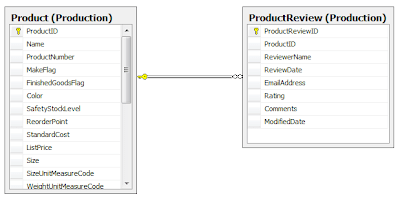 The issues which we are going to solve with conventions include:
Here is how we can create conventions which are specific for AdventureWorks database:
IClassConvention
I think comments explain everything but I would like to stress the way Accept() method was implemented in. It's important to remeber that we don't always want to apply our conventions! If, for some reason, in mapping class WithTable(...) method was called to set specific table name then we shouldn't overwrite it.
Default convention for identity properties is also fairly straightforward - property name equals column name. If you need to change it then again there are two options:
A few words of explanation, in database, primary keys are named like ProductID, ProductReviewID whereas in our class I want to stay with simple Id property for each class. Hence, to build column name it's required to use class name (for instance Product) and add "ID".
IReferenceConvention and IHasManyConvention
To recap quickly, we have two following tables:
 The issues which we are going to solve with conventions include:
AdventureWorks database doesn't follow the default convention. Differences:
- table name is different then class name (Product vs Production.Product)
- id property has different name then primary key column (Id vs ProductID)
- properties representing links between tables have different names then foreign key column names (Product vs ProductID)
Here is how we can create conventions which are specific for AdventureWorks database:
IClassConvention
By default class name equals table name. If for some reason it's not true in your case then basically you have two options:
- in each mapping class you can call WithTable(...) method and pass as a parameter your custom table name
- create your own convention by implementing IClassConvention
Of course second option is preferable in most cases, IClassConvention interface has to methods which need to be implemented:
1: public bool Accept(IClassMap target)
2: {3: // apply this convention if table wasn't specified with WithTable(..) method
4: return string.IsNullOrEmpty(target.TableName);
5: } 6: 7: public void Apply(IClassMap classMap)
8: {9: // table name can be like:
10: // "Production." + class name or "Sales." + class name
11: // "Production" and "Sales" are the last parts of the namespace
12: 13: var lastElementOfNamespace = classMap.EntityType.Namespace14: .Substring(classMap.EntityType.Namespace.LastIndexOf('.') + 1);
15: 16: classMap.WithTable(String.Format("{0}.{1}", lastElementOfNamespace, classMap.EntityType.Name));
17: }I think comments explain everything but I would like to stress the way Accept() method was implemented in. It's important to remeber that we don't always want to apply our conventions! If, for some reason, in mapping class WithTable(...) method was called to set specific table name then we shouldn't overwrite it.
IIdConvention
Default convention for identity properties is also fairly straightforward - property name equals column name. If you need to change it then again there are two options:
- in mapping class you can specify column name like this: Id(x => x.Id, "ProductID");
- or implement IIdConvention and provide your own convention
1: public bool Accept(IIdentityPart target)
2: {3: // make sure that column name wasn't set by calling Id(x => x.Id, "...")
4: return string.IsNullOrEmpty(target.GetColumnName());
5: } 6: 7: public void Apply(IIdentityPart target)
8: {9: // primary key = class name + "ID"
10: target.ColumnName(target.EntityType.Name + "ID");
11: }IReferenceConvention and IHasManyConvention
Last issue to deal with are foreign keys. ProductReview table has foreign key to Product table, as usually, property name (Product) is different then column name (ProductID) and therefore instead of specifing that (References(x => x.Product, "ProductID");) we can implement IReferenceConvention interface:
And to map easily other side of this association, without spcifying key column names we have to implement IHasManyConvention:
Please note that in last example we are not only setting key column name but also some other parameters like lazy load and inverse.
1: public bool Accept(IManyToOnePart target)
2: {3: // make sure that column name wasn't set with References(x => x.Product, "...");
4: return string.IsNullOrEmpty(target.GetColumnName());
5: } 6: 7: public void Apply(IManyToOnePart target)
8: {9: // foreign key column name = property name + "ID"
10: //
11: // it will be used in case like this:
12: // <many-to-one name="Product" column="ProductID" />
13: 14: target.ColumnName(target.Property.Name + "ID");
15: }1: public bool Accept(IOneToManyPart target)
2: {3: return target.KeyColumnNames.List().Count == 0;
4: } 5: 6: public void Apply(IOneToManyPart target)
7: {8: // foreign key column name = class name + "ID"
9: //
10: // it will be used to set key column in example like this:
11: //
12: // <bag name="ProductReview" inverse="true">
13: // <key column="ProductID" />
14: // <one-to-many class="AdventureWorksPlayground...ProductReview, AdventureWorksPlayground, ..." />
15: // </bag>
16: 17: target.KeyColumnNames.Add(target.EntityType.Name + "ID");
18: target.LazyLoad(); 19: target.Inverse(); 20: }Last words
As you can see with new API you need to write slightly more lines of code to achieve the same effect but I think it's a fair trade off for much greater control and flexibility.
This post is just "touching" the subject, you can find much more about conventions and different interfaces on wiki.
Related posts:
Thursday, 26 March 2009
TDD with EPiServer
During the last Demo Day (conference organized by Cognifide every 3-4 months) I had a chance to talk about Test Driven Development in EPiServer projects. In this post I would like to recap main points of my presentation.
Obstacles on the way to TDD
Unfortunately it's very hard to apply TDD to ASP.NET WebForms as it is. WebForms was designed as a platform for Rapid Application Development. Features like wide set of rich controls and state management (view state) can significantly speed up development but in the same time WebForms does not provide decent separation of concerns. I think code-behind files were suppose to give us some separation between the HTML and application logic. And to be fair it's "some" separation, but we still need to deal in one code-behind file with ASP.NET components, which are tightly bound to the underlying HttpContext, presentation logic and usually a few other things. It's clearly too much. There are way too many concerns in one place, too many dependencies on ASP.NET runtime. It makes code in applications like this hard to maintain and also makes writing unit test impossible.
Another thing with which you have to cope with is EPiServer. To get an idea of problems which you may encounter check this unit tests:
Basically I'm creating PageData instance with a few properties and then I'm checking if correct values will be returned. This is probably the simplest unit test ever. So if you run it then you don't expect anything else then a green bar right? Surprisingly, instead of green bar you will get exception saying:
If you want to know who you should blame for calling Settings.Instance then check PropertyXhtmlString :)
As you may know, HttpContext can be mocked, it's not a problem. But in our case it won't help much, we won't get this exception of course, but we will get different one instead.
As you can see the way to TDD is not easy, EPiServer is also closely bound to HttpContext.
Deal with problems in two steps
Step 1 - Isolate as much functionality as you can away from ASP.NET runtime. How? Introduce design pattern called Model-View-Presenter (MVP). This pattern divides the responsibilities into separate classes:
 There are minor differences between both versions, you can learn more about both versions on Martin Fowler's site: Passive View and Supervising Controller.
Let me show you how it works in practice. I'm going to implement well known news page from EPiServer's public templates, the page for visitors looks like this:

Areas which are set by news page are marked with red rectangles. Other data comes from MasterPage. Below you can check how the aspx file:
As you can see, so far nothing surprising. But now, instead of jumping to the code-behind file, you should create an interface for the view. I'm going to call my interface INewsView and this is how it looks like:
INewsView interface defines a contract between presenter and view. View needs to get above data from presenter and presenter is obligated to deliver them.
Having the interface ready we can start working on the presenter, the simplest implementation looks like this:
PresenterUtils class is just my helper which is returning values of properties if they are set, or default values otherwise. There is no magic here but as you may notice, logic dealing with CurrentPage is located in one place which makes it much more reusable.
Now we have NewsPresenter ready we can piece it all together. The only missing part is implementation of INewsView interface:
This class is located in code-behind file, it implements INewsView interface and represents a link between NewsPresenter and the view and actual ASP.NET controls.
What you can't see in this class is how the presenter is instantiated, when the view implementation is passed to the presenter, this is wrapped in SimpleMVPPageBase class:
SimpleMVPPageBase class is responsible for two things:
Within Before_each_test() method I'm basically creating an instance of PageData with a few properties. I'm also mocking the view using Rhino Mocks. Thanks to that in It_should_set_all_properties() method I can record my expectations and later verify them.
But wait a second ... as I was writing earlier, EPiServer requires valid HttpContext right?
Workaround for this issue is a step 2 on our way to TDD:
HttpContext related exception won't be triggered if you create instance of Settings and using reflection assign it to the static and private field _instance on Settings class. This way you can also provide your configuration for tests.
Conclusions
Obstacles on the way to TDD
Unfortunately it's very hard to apply TDD to ASP.NET WebForms as it is. WebForms was designed as a platform for Rapid Application Development. Features like wide set of rich controls and state management (view state) can significantly speed up development but in the same time WebForms does not provide decent separation of concerns. I think code-behind files were suppose to give us some separation between the HTML and application logic. And to be fair it's "some" separation, but we still need to deal in one code-behind file with ASP.NET components, which are tightly bound to the underlying HttpContext, presentation logic and usually a few other things. It's clearly too much. There are way too many concerns in one place, too many dependencies on ASP.NET runtime. It makes code in applications like this hard to maintain and also makes writing unit test impossible.
Another thing with which you have to cope with is EPiServer. To get an idea of problems which you may encounter check this unit tests:
1: [Test]2: public void MyEPiServerUnitTest()
3: {4: var page = new PageData();
5: page.Property.Add("MetaAuthor", new PropertyString { Value = "MetaAuthor123" });
6: page.Property.Add("Heading", new PropertyString { Value = "Heading123" });
7: page.Property.Add("MainBody", new PropertyXhtmlString { Value = "MainBody123" });
8:
9: Assert.IsTrue(page["MainBody"].Equals("MainBody123"));
10: } System.ApplicationException: First time you call Settings.Instance you must have a valid HttpContext.If you want to know who you should blame for calling Settings.Instance then check PropertyXhtmlString :)
As you may know, HttpContext can be mocked, it's not a problem. But in our case it won't help much, we won't get this exception of course, but we will get different one instead.
As you can see the way to TDD is not easy, EPiServer is also closely bound to HttpContext.
Deal with problems in two steps
Step 1 - Isolate as much functionality as you can away from ASP.NET runtime. How? Introduce design pattern called Model-View-Presenter (MVP). This pattern divides the responsibilities into separate classes:
- View - those are *.aspx and *.ascx files including code-behind files. This layer should be as thin as possible, code-behind files should delegate as much functionality as possible to the Presenter.
- Presenter is responsible for interface logic which includes initialization of view and dealing with all events. It's important that presenter shouldn't have any reference to System.Web namespace and should be separated from the concrete view with an interface. Additionally presenter has access to business layer and/or backend services.
- Model - the data on which application is working on, for EPiServer those might be pages, users, files, data stored in the HttpSession etc.
 There are minor differences between both versions, you can learn more about both versions on Martin Fowler's site: Passive View and Supervising Controller.
Let me show you how it works in practice. I'm going to implement well known news page from EPiServer's public templates, the page for visitors looks like this:

Areas which are set by news page are marked with red rectangles. Other data comes from MasterPage. Below you can check how the aspx file:
1: <asp:Content ID="Content4" ContentPlaceHolderID="MainBodyRegion" runat="server">
2: <div id="MainBody">
3: <h1><asp:Literal ID="litHeading" runat="server" /></h1>
4: <asp:Literal ID="litMainBody" runat="server" />
5: </div>
6: </asp:Content>
7:
8:
9: <asp:Content ID="Content5" ContentPlaceHolderID="SecondaryBodyRegion" runat="server">
10: <div id="SecondaryBody">
11: <dl>
12: <dt><EPiServer:Translate ID="author" runat="server" Text="/news/writername" /></dt>
13: <dd><asp:Literal ID="litMetaAuthor" runat="server" /></dd>
14: <dt><EPiServer:Translate ID="Translate1" runat="server" Text="/news/publishdate" /></dt>
15: <dd><asp:Literal ID="litPageStartPublish" runat="server" /></dd>
16: </dl>
17: </div>
18: </asp:Content>
As you can see, so far nothing surprising. But now, instead of jumping to the code-behind file, you should create an interface for the view. I'm going to call my interface INewsView and this is how it looks like:
1: public interface INewsView
2: { 3: String Heading { get; set; } 4: String MainBody { get; set; } 5: String MetaAuthor { get; set; } 6: String PageStartPublish { get; set; }7: }
Having the interface ready we can start working on the presenter, the simplest implementation looks like this:
1: public class NewsPresenter : AbstractPresenterBase<INewsView>
2: {3: public override void Initialize()
4: {5: View.MetaAuthor = PresenterUtils.GetPropertyValue(CurrentPage, "MetaAuthor", "");
6: View.PageStartPublish = PresenterUtils.GetProperty<DateTime>(CurrentPage, "PageStartPublish", "",
7: x => x.ToShortDateString());8:
9: View.Heading = PresenterUtils.GetPropertyValue(CurrentPage, "Heading", "");
10: View.MainBody = PresenterUtils.GetPropertyValue(CurrentPage, "MainBody", "");
11: } 12: }Now we have NewsPresenter ready we can piece it all together. The only missing part is implementation of INewsView interface:
1: public partial class NewsItem : SimpleMVPPageBase<NewsPresenter, INewsView>, INewsView
2: {3: protected override INewsView ViewImplementation
4: {5: get { return this; }
6: }7:
8: public String MetaAuthor
9: {10: get { return litMetaAuthor.Text; }
11: set { litMetaAuthor.Text = value; }
12: }13:
14: public String PageStartPublish
15: {16: get { return litPageStartPublish.Text; }
17: set { litPageStartPublish.Text = value; }
18: }19:
20: public string Heading
21: {22: get { return litHeading.Text; }
23: set { litHeading.Text = value; }
24: }25:
26: public string MainBody
27: {28: get { return litMainBody.Text; }
29: set { litMainBody.Text = value; }
30: } 31: }What you can't see in this class is how the presenter is instantiated, when the view implementation is passed to the presenter, this is wrapped in SimpleMVPPageBase class:
1: public abstract class SimpleMVPPageBase<PresenterClass, ViewInterface> : SimplePage
2: where PresenterClass : AbstractPresenterBase<ViewInterface>, new()
3: {4: protected PresenterClass Presenter;
5: protected abstract ViewInterface ViewImplementation { get; }
6:
7: protected override sealed void OnInit(EventArgs e)
8: {9: base.OnInit(e);
10: Presenter = new PresenterClass
11: { 12: View = ViewImplementation, 13: CurrentPage = CurrentPage 14: }; 15: }16:
17: protected override sealed void OnLoad(EventArgs e)
18: {19: base.OnLoad(e);
20: if (!IsPostBack)
21: { 22: Presenter.Initialize(); 23: DataBind(); 24: } 25: } 26: }SimpleMVPPageBase class is responsible for two things:
- It instantiates presenter class, and sets for it CurrentPage and view implementation.
- Also, within OnLoad, it calls Presenter.Initialize() method which should initialize the view.
1: public class Checking_news_view_initialization : AbstractPresenterTest<NewsPresenter>
2: {3: protected override void Before_each_test()
4: { 5: Presenter.CurrentPage = EPiServerPage.CreateBlankPage()6: .AddProperty<PropertyString>("MetaAuthor", "author123")
7: .AddProperty<PropertyString>("Heading", "heading123")
8: .AddProperty<PropertyXhtmlString>("MainBody", "mainBody123")
9: .AddProperty<PropertyDate>(EPiProperties.PageStartPublish, DateTime.Today) 10: .Instance();11:
12: Presenter.View = mocks.StrictMock<INewsView>(null);
13: }14:
15: [Test]16: public void It_should_set_all_properties()
17: {18: using (mocks.Record())
19: {20: Expect.Call(Presenter.View.Heading).SetPropertyWithArgument("heading123");
21: Expect.Call(Presenter.View.MainBody).SetPropertyWithArgument("mainBody123");
22: Expect.Call(Presenter.View.MetaAuthor).SetPropertyWithArgument("author123");
23: Expect.Call(Presenter.View.PageStartPublish).SetPropertyWithArgument(DateTime.Today.ToShortDateString()); 24: }25:
26: using (mocks.Playback())
27: { 28: Presenter.Initialize(); 29: } 30: } 31: }Within Before_each_test() method I'm basically creating an instance of PageData with a few properties. I'm also mocking the view using Rhino Mocks. Thanks to that in It_should_set_all_properties() method I can record my expectations and later verify them.
But wait a second ... as I was writing earlier, EPiServer requires valid HttpContext right?
Workaround for this issue is a step 2 on our way to TDD:
1: [TestFixture]2: public abstract class AbstractPresenterTest<PresenterClass> where PresenterClass : new()
3: {4: protected PresenterClass Presenter { get; private set; }
5: protected MockRepository mocks { get; private set; }
6:
7:
8: protected AbstractPresenterTest()
9: {10: Presenter = new PresenterClass();
11: }12:
13: [TestFixtureSetUp]14: protected void SetUpContextForAWholeFixture()
15: {16: var settings = new EPiServer.Configuration.Settings
17: { 18: StringCompressionThreshold = 0 19: };20:
21: Type settingsType = settings.GetType();22: settingsType.GetField("_instance", BindingFlags.Static | BindingFlags.NonPublic)
23: .SetValue(settings, settings); 24: }25:
26: [SetUp]27: protected void SetUpContextForEachTest()
28: {29: mocks = new MockRepository();
30: Before_each_test(); 31: }32:
33: protected abstract void Before_each_test();
34: }HttpContext related exception won't be triggered if you create instance of Settings and using reflection assign it to the static and private field _instance on Settings class. This way you can also provide your configuration for tests.
Conclusions
- the most important one is that Test Driven Development with EPiServer is possible!
- you need to isolate as much functionality from ASP.NET runtime and MVP design patter is doing exactly that for you
- with a little bit of hacking of EPiServer you can instantiate PageData and test your logic
- MVP requires additional effort to create interfaces, presenters etc. Downside is that you won't be able to build web applications so rapidly but it should pay off in longer and more complex projects where having a set of automated tests is a big advantage.
- My research and presentation were inspired by Raymond Lewallen who was a guest of Poznan .Net Group and was presenting Behavioral Driven Development approach.
- I have used image from Microsoft site talking about MVP.
Subscribe to:
Posts (Atom)